

AI hardware has followed a familiar pattern in recent years:
More functions, more features, more AI.
Translation devices are no exception.
Modern products can combine voice translation, photo translation, recording, text recognition, AI assistants, video translation, and other functions.
But adding more capabilities creates another challenge:
Does the device become harder to use?
For many translation users, the answer should ideally be no.
A person using a translator during a conversation does not necessarily want to navigate complicated menus.
They simply want to:
Press → Speak → Translate
Vasco M4 represents a product direction focused on simplifying this interaction.
Designing Translation Around Simplicity
According to Vasco, the M4 is an independent handheld translation device designed to provide automatic translation without requiring users to rely on a smartphone.
The company lists support for 86 voice translation languages, 113 photo translation languages, and 108 text translation languages, together with automatic speech translation and connectivity in nearly 200 countries and regions.
The device also uses physical controls rather than relying entirely on touchscreen interaction.
This reflects an important product-design principle:
Advanced technology does not necessarily require complicated user interaction.
Why Physical Buttons Still Matter
Touchscreens dominate modern consumer electronics, but translation devices have a unique usage environment.
Users often operate them while actively communicating with another person.
Imagine a user having to:
Unlock → Open an App → Select a Language → Select a Mode → Start Translation
This interrupts the conversation.
A dedicated physical control can reduce the number of steps:
Press → Speak → Translate
This can be particularly useful in situations such as:
- Outdoor environments
- Travel
- Fast business conversations
- Users unfamiliar with complex interfaces
- Cold environments where touchscreen operation is inconvenient
In these situations, simplicity becomes a functional advantage.
More AI Behind the Scenes, Less Complexity in Front
The interesting contradiction in modern AI hardware is that the technology is becoming increasingly complicated while the user interface can become increasingly simple.
Behind a single translation button, a device may rely on:
- Automatic speech recognition
- Language detection
- Machine translation
- Text-to-speech
- AI models
- Cloud services
- Offline translation models
- Connectivity management
The user does not need to see all of that.
Ideally, the user only needs to know:
Press. Speak. Understand.
F10 Takes a Different Approach
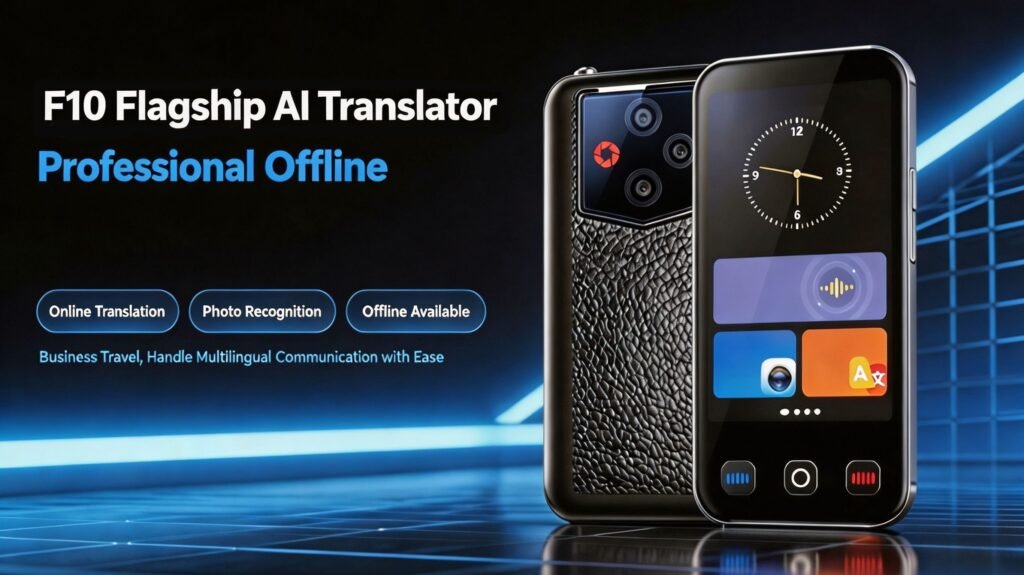
Our F10 AI Translation Device focuses on combining a broad set of communication functions within one dedicated handheld device.
The device features a high-definition display, an integrated metal frame, and a textured back cover.
Its functionality includes 139-language real-time translation, 27 offline languages, photo translation, speech-to-text recording, real-time voice translation, two-way simultaneous interpretation, real-time bilingual subtitles, conversation recording, translation playback, an AI assistant, world time settings, and currency conversion.
This creates a different product philosophy:
Keep the device independent while bringing multiple communication functions into one place.
Instead of requiring users to switch between different apps or devices, the translator can serve as a dedicated communication terminal.
F80 Focuses on Connectivity
Our F80 AI Translation Device takes another approach by integrating SIM-card support into the product.
It supports more than 150 online languages and nine dialects, together with 27 offline languages.
The device also provides:
- Video-call translation
- Photo translation
- Text input translation
- Recording translation
- Simultaneous interpretation
- AI assistance
This combination allows the device to address both local face-to-face communication and connected remote communication.
Functionality Should Follow the User
The key lesson from the latest translation hardware is not necessarily that manufacturers should add fewer features.
The more important principle is:
The features should match the user’s actual needs.
A travel-focused device might prioritize:
Voice + Photo + Offline Translation
A business device might prioritize:
Voice + Recording + Subtitles
An enterprise solution might prioritize:
Translation + Meetings + Data Management
A connected international communication device might prioritize:
SIM + Video Calls + Translation
The hardware and software should therefore be designed around the target application instead of simply accumulating features.
What This Means for Translation Device OEM
For OEM and ODM customers, product simplicity can become an important competitive factor.
The backend technology can be sophisticated, but the user experience should remain intuitive.
This creates opportunities for customization in:
- Industrial design
- Button layout
- Screen interface
- Translation modes
- Connectivity
- Offline language packages
- Recording functions
- AI assistants
- Target-market software
- Brand and packaging
A successful OEM product does not necessarily need to offer every possible AI feature.
It needs to offer the right features in the right way.
The Future of Translation Device Design
Vasco M4 illustrates a broader direction in AI hardware:
As the technology becomes more sophisticated, the user experience should become simpler.
This principle may become increasingly important as translation devices evolve from specialized language tools into broader AI communication products.
The strongest products may not be the ones with the longest feature lists.
They may be the ones that make advanced AI feel almost invisible.